

Description
Download On Screen Keyboard Portable – Free Virtual Keyboard for Windows, Mac, Android & iOS
Looking for a reliable, lightweight, and portable virtual keyboard? On Screen Keyboard Portable is a free, no-installation solution that brings a fully functional keyboard to your screen—ideal for emergencies, touchscreens, kiosks, or when your physical keyboard fails. This versatile tool supports multiple input methods, including mouse clicks, hover, and scan mode, making it perfect for users with limited mobility or those working on older systems. With a clean interface, customizable settings, and full portability via USB drive, it’s a must-have utility for anyone needing a secure, fast, and accessible typing solution on the go.
Why On Screen Keyboard Portable Stands Out in the Virtual Keyboard Market
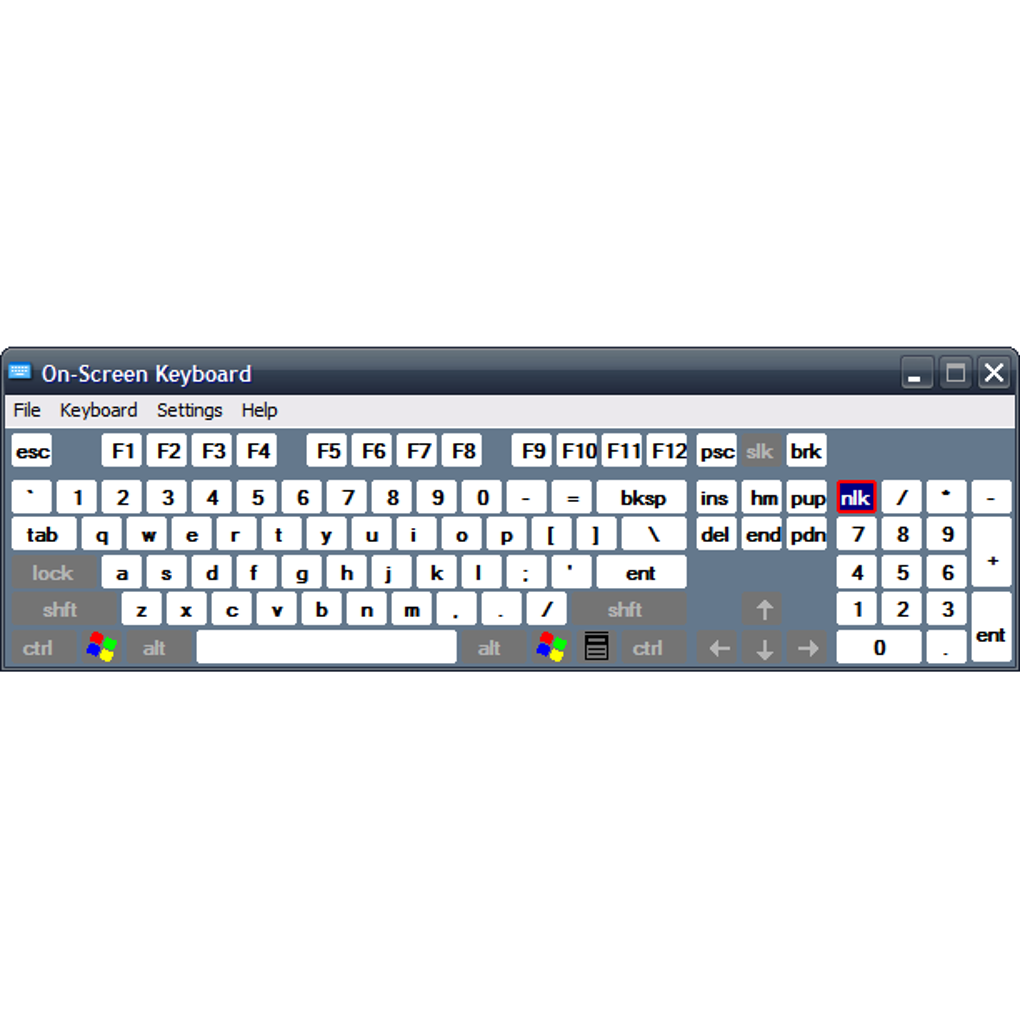
When your physical keyboard fails or you're working on a device without one, a virtual keyboard becomes essential. On Screen Keyboard Portable delivers exactly that—without the bloat. Unlike many basic on-screen keyboards that offer only standard keys, this app includes a full set of function keys, navigation keys (arrow keys, Insert, Print Screen), and even Scroll Lock—features often missing in modern software. The clean, minimal interface ensures you can start typing immediately after launching, with no distractions or complex setup. One of its standout features is the “Dock Key”, which lets you lock the keyboard to the bottom of your screen, preventing accidental movement. Once docked, it expands to fill the bottom edge, creating a stable typing zone that’s perfect for long writing sessions or public kiosk use. The app is designed with accessibility in mind. It supports multiple input methods: mouse click, hover, and scan mode. The scan mode is especially useful for users with motor impairments, allowing them to navigate keys using a joystick, gamepad, or keyboard. You can adjust the scanning speed to suit your typing rhythm. Additionally, the text prediction feature brings a modern touch—similar to mobile keyboards—where typing a few letters triggers word suggestions. You can even set it to auto-insert a space after each suggestion, speeding up your workflow. Despite its simplicity, the app remembers your preferences across sessions, so you don’t have to reconfigure settings every time. Whether you're using it on a touchscreen tablet, an older laptop, or a public computer, On Screen Keyboard Portable offers a seamless, secure, and efficient typing experience.Easy Installation, Full Portability, and Cross-Platform Support
One of the biggest advantages of On Screen Keyboard Portable is its portability. Unlike traditional software that requires installation and leaves traces on your system, this app runs directly from a USB flash drive or external storage. Simply copy the entire folder to your drive, plug it into any Windows, Mac, Android, or iOS device (with compatible support), and launch the executable file. No admin rights needed, no registry changes—just plug and play. This makes it ideal for IT professionals, students, or travelers who need a consistent keyboard solution across multiple devices. The software is lightweight and optimized for performance. It consumes minimal RAM and CPU, ensuring it won’t slow down older systems or affect other applications. It’s also compatible with a wide range of operating systems, including Windows 7 through Windows 11, macOS Mojave and later, Android 6.0+, and iOS 12+. This cross-platform flexibility means you can use it on desktops, laptops, tablets, and even touchscreen kiosks. For users with accessibility needs, the app works flawlessly with external input devices like joysticks, gamepads, and trackballs, expanding its usability beyond standard mouse interaction. Setting up the app is straightforward. Once launched, you can access the settings menu to enable features like click sound feedback, toggle the numeric keypad, or adjust scan speed. The interface is intuitive—no technical knowledge required. Whether you're in a classroom, office, or on a business trip, having a portable keyboard at your fingertips ensures you’re never without typing capability. With automatic configuration saving, your preferred settings stay intact even after closing the app.Pros, Cons, and Frequently Asked Questions
- Pros:
- Completely portable – runs from USB drive with no installation
- Supports multiple input methods: mouse, hover, scan, and gamepad
- Includes full keyboard layout with function keys, navigation keys, and Scroll Lock
- Text prediction and auto-space feature for faster typing
- Lightweight and doesn’t impact system performance
- Memory of user settings across sessions
- Cons:
- Limited visual customization options
- No built-in keyboard layout switching (e.g., QWERTY, AZERTY)
- Interface is minimal—may feel outdated to some users
- Not available as a native app for iOS and Android (only works via web or emulator)
FAQ – Frequently Asked Questions
Is On Screen Keyboard Portable free to download and use?
Yes, On Screen Keyboard Portable is completely free to download and use. There are no hidden fees or subscription models. You can access all core features—including text prediction, scan mode, and dock functionality—without any cost.
Can I use this on my Mac or mobile device?
Yes, it’s compatible with macOS Mojave and later, as well as Android 6.0+ and iOS 12+. However, for mobile devices, you may need to use a compatible emulator or web-based version, as it’s not available as a native app on all platforms.
Does it work with joysticks and gamepads?
Absolutely. The app supports external input devices like joysticks, gamepads, and trackballs, making it ideal for users with motor disabilities or those working in specialized environments like kiosks or gaming setups.
How do I update the software?
Since it’s portable, you’ll need to manually download the latest version from the official website and replace the files on your USB drive. Always back up your settings before updating to avoid losing preferences.
Can I customize the keyboard layout?
While the app doesn’t support multiple keyboard layouts (like AZERTY or Dvorak), you can toggle the numeric keypad and adjust scan speed and hover duration. Full layout customization is not available, but the standard QWERTY layout is fully functional.
Final Verdict: A Reliable, Secure, and Portable Typing Solution
In a world where physical keyboards fail unexpectedly, On Screen Keyboard Portable offers a dependable, secure, and hassle-free alternative. Its portability, lightweight design, and support for multiple input methods make it a standout tool for students, professionals, and accessibility users alike. While it lacks advanced visual customization and layout switching, its core functionality is rock-solid—delivering fast, accurate typing with minimal system impact. If you’re looking for a free virtual keyboard that works on Windows, Mac, Android, and iOS without installation, this app is a top choice. Whether you're in a pinch, using an old workstation, or managing a public kiosk, it’s a reliable backup that remembers your settings and adapts to your workflow. Download On Screen Keyboard Portable today and keep your productivity uninterrupted—no matter where you are.Guides & Tutorials for On Screen Keyboard Portable
How to install On Screen Keyboard Portable
- Click the Preview / Download button above.
- Once redirected, accept the terms and click Install.
- Wait for the On Screen Keyboard Portable download to finish on your device.
How to use On Screen Keyboard Portable
This software is primarily used for its core features described above. Open the app after installation to explore its capabilities.
User Reviews for On Screen Keyboard Portable 0
No reviews found





